
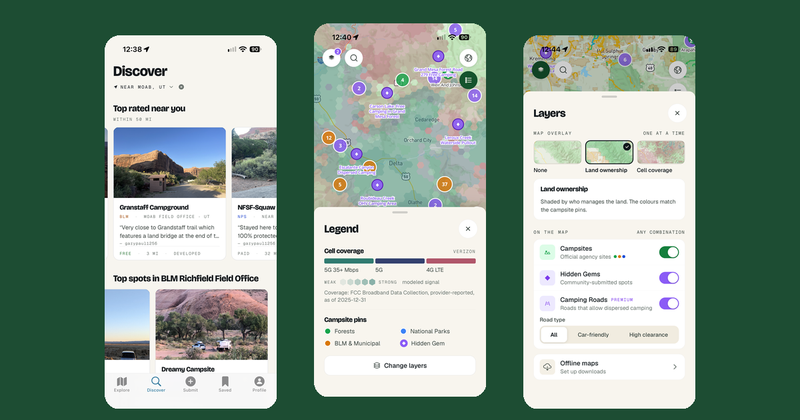
Dispersed 1.4 is out on iOS and Android. It adds a new Discover tab, a free cell coverage map, two new premium filters for cell signal and nearby water, and a rebuilt layer and filter panel. Most of these features are also in the web app at app.dispersedapp.com.
Here is what changed.
Discover: a feed of good campsitesThe map is still the fastest way to find a spot when you know where you're going. Discover is for when you don't.
The new Discover tab, second in the tab bar, is a feed of campsites arranged in rows:
- Top rated near you
- Top spots in a specific national forest or BLM field office
- Hot spots near a gateway town
- Free and stunning
- Quiet spots
- Fresh check-ins
- Worth paying for
- Van and 2WD friendly
- Most saved
Each card shows the managing agency, a short quote from a recent check-in, whether the site is free or paid, and the distance or elevation. Tap a card to open the full site details, or tap Map to jump straight to it on the Explore tab.
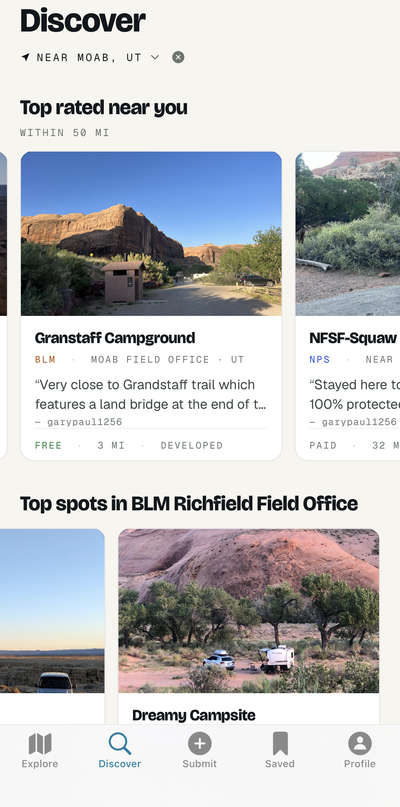
Rows are built from your location by default. Use "Discover near..." to search any place in the US or Canada and see what's around it. Discover also mixes in destination rows: popular camping areas more than 200 miles away, for when you're planning a bigger trip.
The rows come from real data. Ratings, check-ins, photos and saves feed the rankings, and the feed refreshes every 30 minutes. Discover is free.
Cell coverage mapWhether you need to work from camp or just want to know if you can call for help, cell signal matters. Dispersed 1.4 adds a cell coverage layer for Verizon, AT&T and T-Mobile, built from FCC coverage data.
Open the Layers panel, choose Cell coverage, and pick a carrier. The map shades coverage by tier (5G+, 5G and LTE) and by signal strength, on both the standard and satellite basemaps. The legend explains each color.
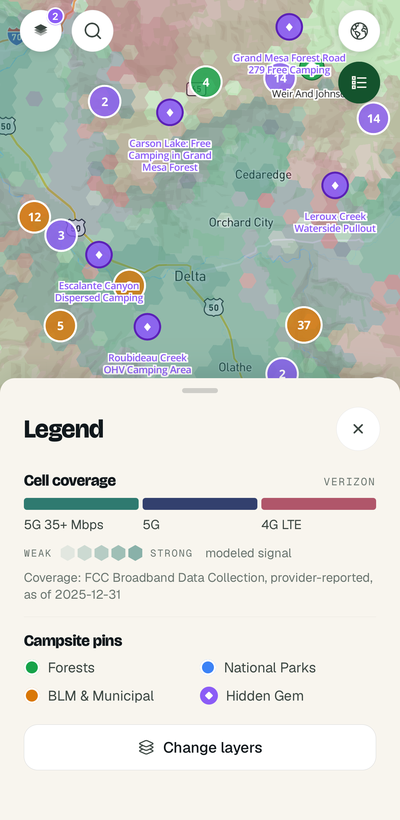
The coverage map is free for everyone. It covers the US only, since the FCC data doesn't extend into Canada.
Cell signal filter and carrier coverage at each sitePremium members get two more cell tools:
- Cell signal filter. Show only campsites with LTE or better coverage. Choose any carrier or a specific one.
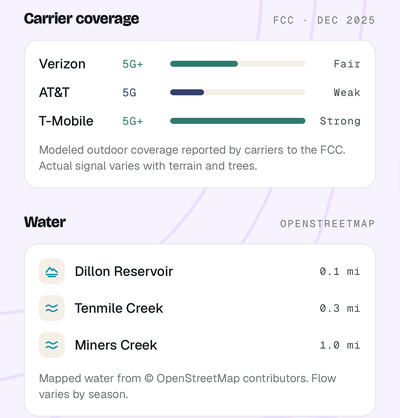
- Carrier coverage in Site Intelligence. Each US campsite's Site Intelligence briefing now lists Verizon, AT&T and T-Mobile coverage at that exact site, with the tier and expected signal strength.
Together with the cell signal reports campers leave in check-ins, you can see both what the FCC data says and what people actually got on the ground.
Near water filter and nearest waterThe second new premium filter is Near water. It shows campsites within a set distance of a named stream, river or lake. Choose the water types you care about and a distance between 100 and 1,000 feet.
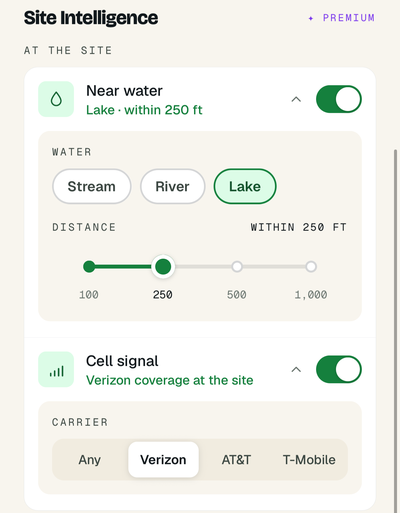
Site Intelligence also gets a new Water block that lists the closest named water to each site, up to three, with distances. The data comes from OpenStreetMap and covers named streams, rivers, lakes, reservoirs and springs across the US and Canada. Intermittent streams, canals and ditches are left out.
 A redesigned layer panel and filters
As we added layers, the old panel was mixing two different things: what's drawn on the map and which campsites show. Version 1.4 separates them.
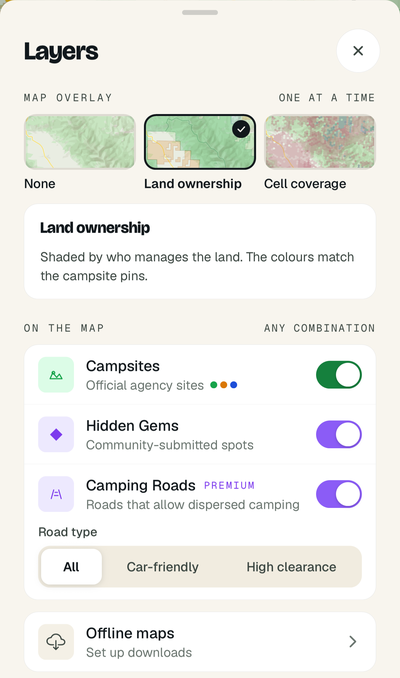
- Layers controls the map. Pick one overlay at a time: none, land ownership, or cell coverage. Below that, toggle campsites, Hidden Gems and Camping Roads. Camping Roads now has a road type setting: all roads, car-friendly or high clearance.
- Campsite Filters controls which campsites appear: free or paid, dispersed or developed, data source, and the premium Near water and Cell signal filters. Filters apply as you change them, and each active filter shows as a removable chip above the tab bar.
- Map legend is a new button under the basemap control. It explains the colors of whatever overlay you have on, plus campsite pins and Camping Roads.
Check-ins feed Trail Reports and Site Intelligence for everyone, so we made them easier to post:
- Written text is now optional. A star rating and site status are enough.
- Site status starts at Open, so you only change it when a site is closed or has a problem.
- If you're signed out, you're asked to sign in before the form opens, and you come back to the same site afterward.
- If a check-in fails to post because you lost signal, the form keeps what you entered so you can try again.
- Map is now Explore, and Trips moved into Saved, next to Lists.
- Submitting a Hidden Gem has a new location picker. Set the location from the map, from your first photo's GPS, from your current position, or by pasting coordinates. A satellite preview shows exactly where the pin will go.
- Saved and Submit have a visual refresh to match the rest of the app, including dark mode.
- Android gets layout fixes for bottom sheets, map controls and the check-in form.
The desktop web app at app.dispersedapp.com has the cell coverage layer, the new layer panel, and the Cell signal and Near water filters, with the same options as mobile. Carrier coverage and nearby water also appear in Site Intelligence on the web. Your account is shared between web and mobile.
Get Dispersed 1.4Update from the App Store or Google Play, or download Dispersed if you're new. Discover and the cell coverage map are free. Premium is $29.99 a year with a 7-day free trial, and covers the mobile app and the web app.